Next.js vs TanStack Start: a benchmark where only the framework differs
On this page
Fair warning first: I am not neutral. Not long ago I wrote on this site why I left Next.js and why we build on TanStack Start. That is exactly why I wanted numbers that hold up not just for me, but for someone who uses Next.js and likes it. The whole benchmark is public on GitHub: both apps, every measurement script, the raw data and the methodology. If you find a mistake, send me a pull request. I will fix it and measure again.
And the result up front: there is no single winner. TanStack Start is much faster and leaner on the server, in the build and in development. Next.js wins where link prefetching and server actions help it. And in what users see when a page loads, the two are practically the same.
How I measured
I built a monorepo with two apps. They have the same pages, the same React components and the same data. Only the framework serving them differs.
| Page | How it renders (in both) | What it tests |
|---|---|---|
/ | prerendered at build time | the baseline cost of the framework |
/blog/[slug] | prerendered, 200 posts | a build with many pages, static serving |
/products?category&sort&page | on the server, on every request | server rendering with URL parameters |
/products/[id] | on the server, on every request, with a form | a dynamic route, data loading, a mutation |
/dashboard | prerendered, 5,000 rows hydrated in the browser | hydration and heavy work on the client |
/api/search | API endpoint | raw server throughput |
Versions are pinned exactly, and each one is at least a week old:
| Version | |
|---|---|
| Next.js (App Router, Turbopack) | 16.4.2 |
| TanStack Start (Vite, Nitro) | 1.169.3, Router 1.170.45, Vite 8.3.4 |
| React | 19.3.1 |
| Node | 24.22.1 |
| Machine | Apple M5 Pro, 15 cores, 48 GB RAM |
To keep it fair, I made sure of the following:
- The same data, without a database or network. Data is generated in memory from a fixed seed, so neither database speed nor network noise is measured. Both apps return the same content.
- Data on the server only, in both. Through server components in Next.js and through server functions (
createServerFn) in Start. On a client-side navigation, both apps fetch it from the server. - The same cache headers. I gave Start exactly the headers Next.js sends by default.
- The same compression. Neither app compresses by itself. For the browser measurements, both sit behind the same compressing proxy, as nginx would do in production.
- Production builds without telemetry, analytics or web fonts.
- Alternating order. Every measurement alternates the order of the apps (A/B, then B/A), so a warming machine helps or hurts neither of them.
- Repetition. Every number is a median of repeated runs: the build 10×, the dev server 5× with five file edits each, Docker 30×, load 3 rounds of 60 s, the browser 30× on desktop and on mobile.
- Idiomatic code. Both apps use their framework's recommended defaults. Where the defaults differ (link prefetching, for example), I kept them and describe the difference in this article.
Results at a glance
| Next.js | TanStack Start | |
|---|---|---|
| Build without cache | 1.91 s | 1.07 s |
| Build with cache | 1.18 s | 1.07 s |
| JavaScript on first load (brotli) | 118 kB | 99 kB |
| Dev server start | 978 ms | 664 ms |
| HMR (editing a shared component) | 77 ms | 103 ms |
| Dev server memory | 893 MB | 589 MB |
| Docker image size | 407 MB | 341 MB |
| Container memory at idle | 81 MB | 47 MB |
| Server rendering a product page | 1,952 req/s | 7,751 req/s |
| Static page | 13,026 req/s | 40,830 req/s |
| LCP, FCP, TTFB, CLS in the browser | the same | the same |
| Navigating to a prefetched static page (mobile) | 51 ms | 532 ms |
| Submitting a form (mobile) | 638 ms | 1,201 ms |
Now each part in detail.
Build and development
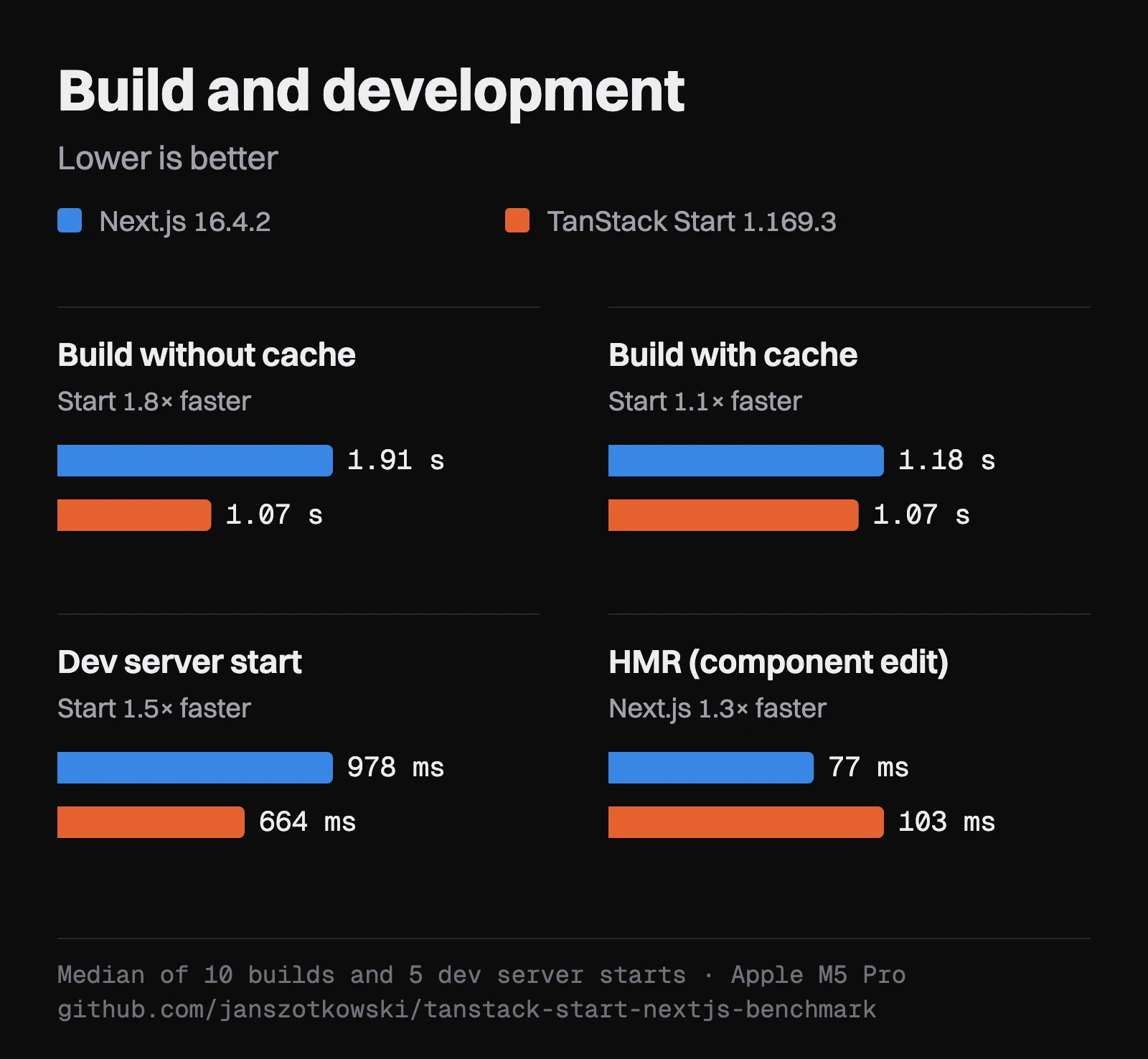
Start builds in roughly half the time: 1.07 s against 1.91 s, including prerendering all 203 pages. Interestingly, Next.js speeds up to 1.18 s on a repeated build thanks to Turbopack's cache, while the cache does not help Start, which builds equally fast every time. Vite has no persistent cache for production builds.
Development shows a similar gap. Start's dev server serves the first page in 664 ms, Next.js in 978 ms. The first compile of the dashboard takes 251 ms against 398 ms, and the whole dev server uses 589 MB of memory against 893 MB.
One thing Next.js does win: HMR, meaning how quickly a file edit shows up in the open browser. Next.js does it in 77 ms, Start in 103 ms. In practice both are below what a person notices, but it belongs here.
For completeness: both apps are small. In a large project the absolute times grow, and the ratio may look different.
What the browser downloads
On first load, the browser downloads 118 kB of JavaScript (brotli-compressed) in six files from Next.js, and 99 kB in three files from Start. The Next.js number does not include the polyfill for old browsers, which a modern browser never downloads.
The size barely changes between pages. Most of it is React and the framework itself, not the code of the pages.
The server under load
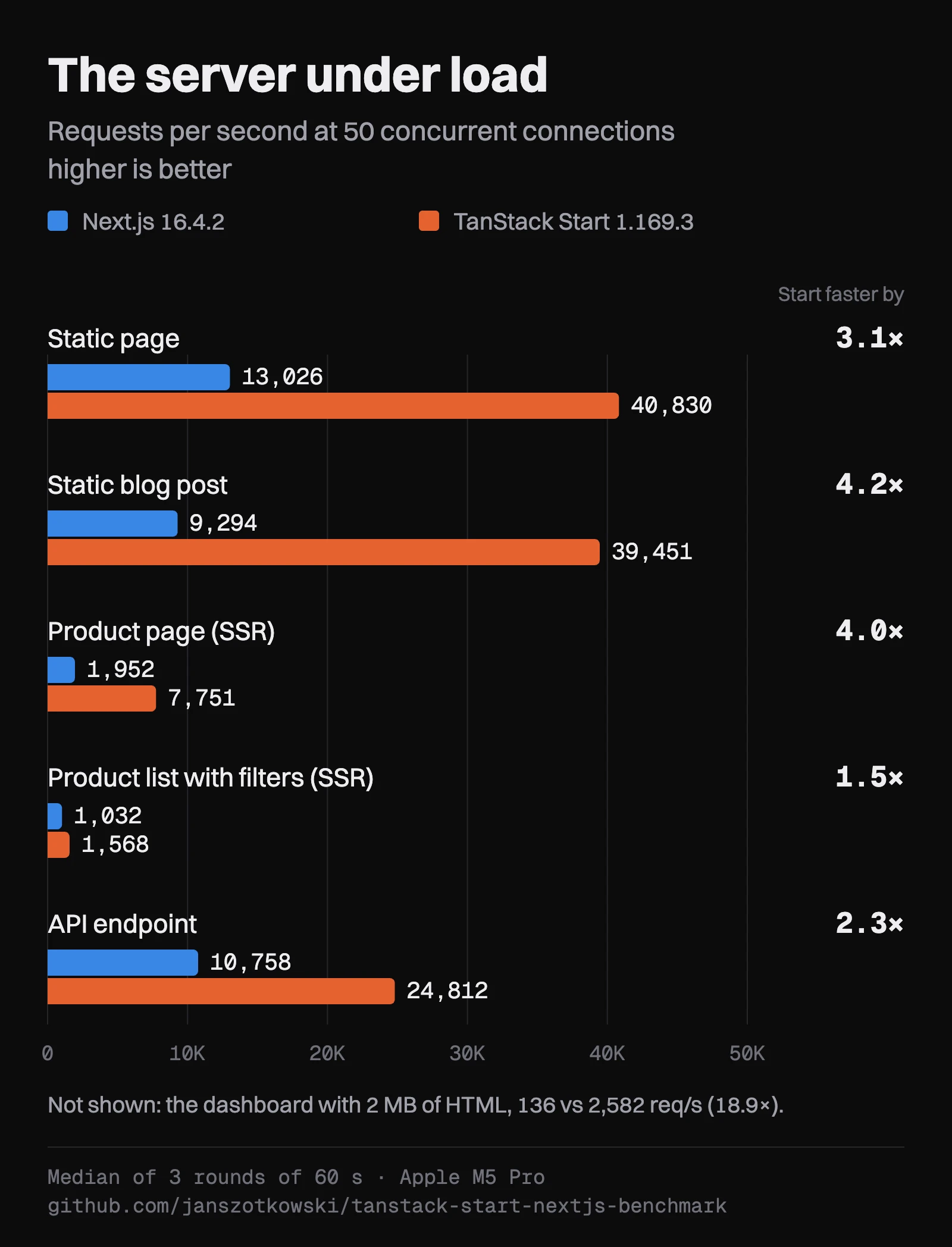
This is where the differences are largest. I loaded each page for 60 seconds with autocannon at 10, 50 and 100 concurrent connections. The table shows 50 connections; the other levels look similar.
| Page | Next.js | TanStack Start | Difference |
|---|---|---|---|
Static / | 13,026 req/s | 40,830 req/s | 3.1× |
| Static blog post | 9,294 req/s | 39,451 req/s | 4.2× |
| Product list with filters (SSR) | 1,032 req/s | 1,568 req/s | 1.5× |
| Product page (SSR) | 1,952 req/s | 7,751 req/s | 4.0× |
| API endpoint | 10,758 req/s | 24,812 req/s | 2.3× |
| Dashboard, 2 MB of HTML | 136 req/s | 2,582 req/s | 19× |
For the static pages I am not sure whether Start has hit the ceiling of the load generator itself, which runs on the same machine at 40 thousand requests per second. Start's real number may therefore be even higher, not lower.
The product list is the exception, where the gap shrinks to 1.5×. Most of the time there goes into filtering and sorting the data, which is application code and the same in both.
The biggest gap is the dashboard with 2 MB of HTML. Next.js pins the CPU at 100% and sends 0.26 GB/s; Start sends 6.7 GB/s. I checked that Start really sends the whole page. The likely cause: by default, Next.js computes an ETag (a content fingerprint for caching) from the full body of every response, while Nitro, which Start runs on, computes it at build time. I did not confirm this with a profiler. At 100 concurrent connections, some Next.js requests for the dashboard then waited longer than 10 seconds. Start had zero errors in the whole load test.
At idle, both apps use little memory: Next.js 104 MB, Start 63 MB.
Docker
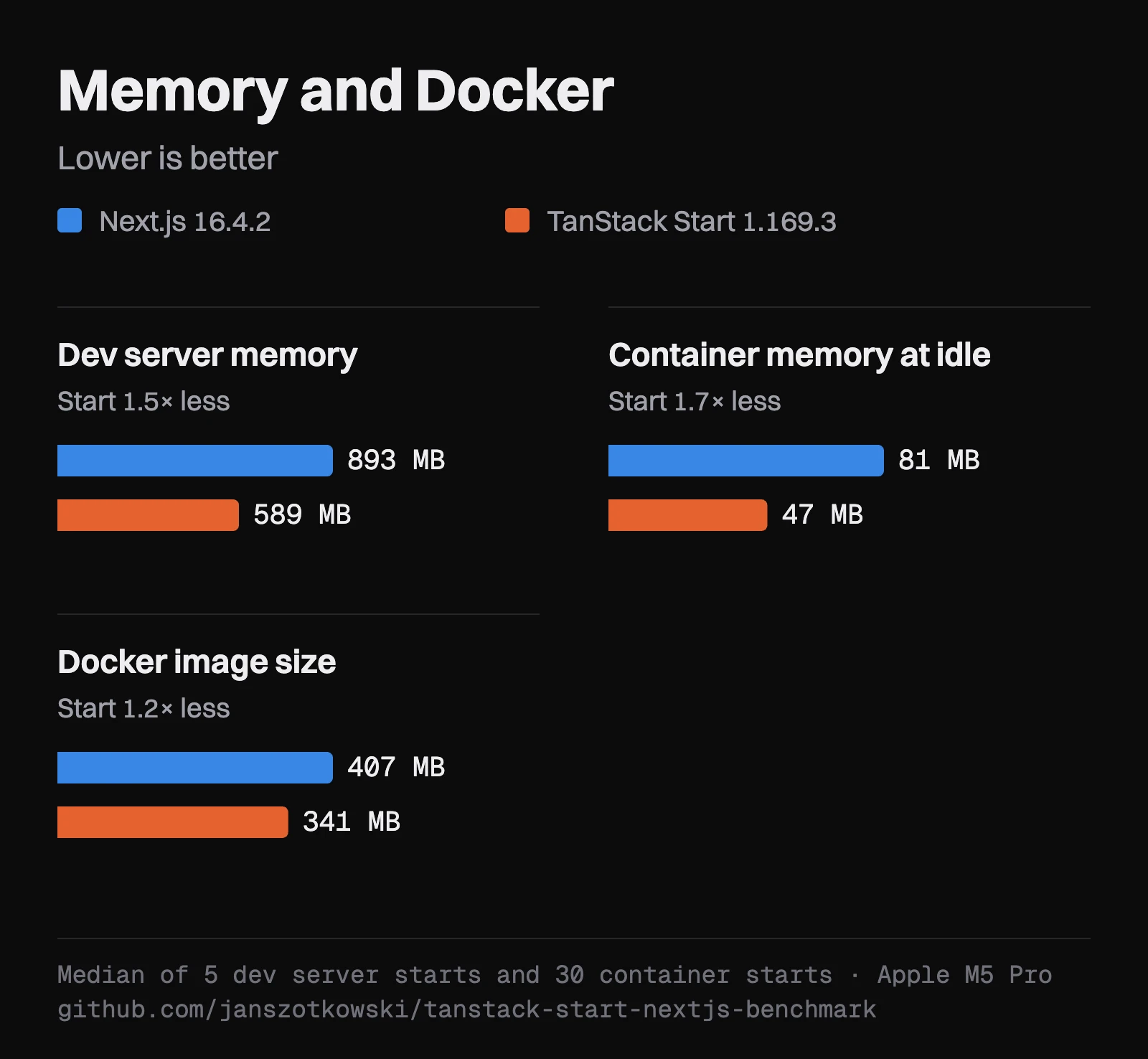
Both apps run on the same base image, node:24.22.1-bookworm-slim, with the same limits: 2 CPUs and 1 GB of memory.
| Next.js | TanStack Start | |
|---|---|---|
| Image size | 407 MB | 341 MB |
From docker run to the first response | 242 ms | 126 ms |
| First server render after start | 61 ms | 56 ms |
| Memory at idle | 81 MB | 47 MB |
The container start includes Docker's own overhead, which is the same for both. If you scale to zero or run many instances, half the start time and 40% less memory make a difference.
In the browser
Here is the result that may surprise you: in what users see when a page loads, the frameworks are practically the same.
I measured with Lighthouse 30× on desktop and 30× on a mobile profile, with a 4× slower CPU and a network like slow 4G (562 ms latency, 1.6 Mbps). LCP, FCP, TTFB and CLS come out the same for both, within noise. On desktop both apps render in 30–40 ms, the dashboard in 130–137 ms. Layout shift (CLS) is zero for both.
Small differences:
- Main-thread blocking (TBT) on mobile: Start has about 30 ms on the server-rendered pages, Next.js about 1 ms. Both are far below the 200 ms that Google considers good, so users will not notice.
- JavaScript execution on mobile: on the home page, a blog post and the product page, Start is slower (about 110 against 75 ms); on the product list both are the same; and on the dashboard with 5,000 rows Start is faster (430 against 472 ms).
- Sorting 5,000 rows on the dashboard takes the same time in both: about 195 ms on desktop and about 800 ms on mobile. That makes sense: the work is done by React and the same component, not by the framework.
Navigation and forms
This is where the frameworks differ most, because of two different default strategies.
Link prefetching. In production, Next.js prefetches the links that are visible on screen. TanStack Start, in its recommended default, prefetches when you hover over a link. On mobile with a slow network it looks like this (I simulated a person who looks at the page for a moment and rests a finger or the pointer on the link for 200 ms before clicking):
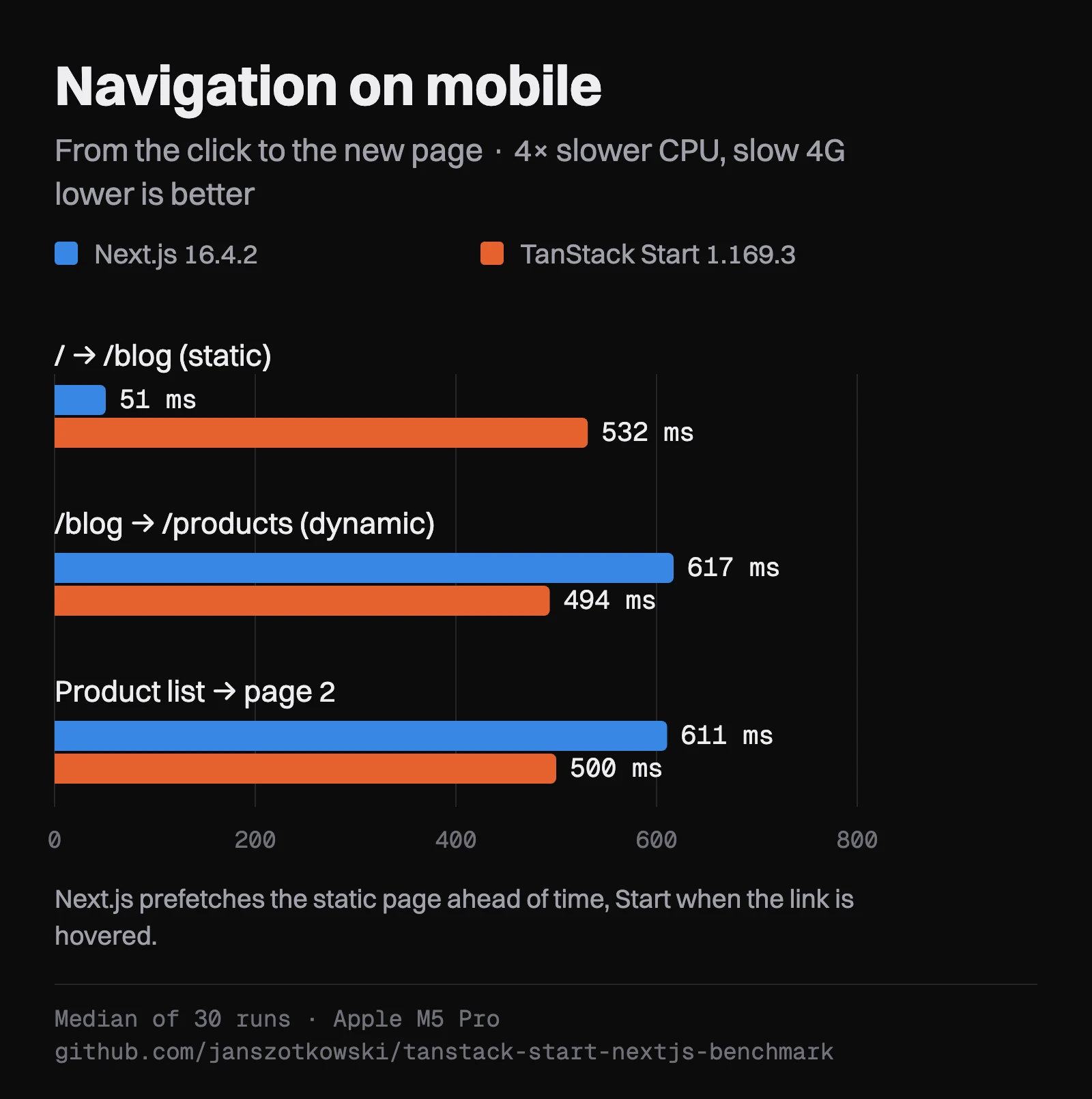
| Navigation (mobile) | Next.js | TanStack Start |
|---|---|---|
/ → /blog (static page) | 51 ms | 532 ms |
/blog → /products (dynamic page) | 617 ms | 494 ms |
| Product list → page two | 611 ms | 500 ms |
Next.js has the whole static page prefetched, so the transition is instant. It cannot prefetch a dynamic page completely, and there Start is a little faster, helped by those 200 ms over the link. So this is a difference in strategy, not in framework speed. Start can prefetch the links on screen too; it is just not its default. Next.js, on the other hand, pays for its prefetching with more requests: on the product list it makes 43 of them on load on desktop and 25 on mobile, Start 5 in both cases.
Submitting a form. Adding a review to a product takes 638 ms on mobile in Next.js and 1,201 ms in Start. I counted the requests, and the reason is clear. A Next.js server action sends the form and gets the new version of the page back in a single response. Start sends the form through a server function and then loads the page again with a second request (router.invalidate()). On a slow network, that is one extra round trip. Both approaches are idiomatic. Start could also do it in one request if the server function returned the new data and the app put it in place itself, but that is extra manual work.
On desktop without a throttled network, every navigation and the form submission take under 50 ms.
What I found along the way
While building the benchmark, I ran into three things that are worth mentioning on their own:
- Start's built-in prerendering is not used by the Node server. When you prerender pages with
tanstackStart({ prerender }), the HTML is written only after Nitro has built its list of static files. The Node server then never serves it and renders the pages again on every request. The dashboard took about 110 ms instead of 4 ms. The fix is to prerender through Nitro (nitro({ prerender: { routes } })); then the pages are served as static files. Checked with Start 1.169.3 and Nitro 3.0.260903-beta. - The Next.js dev server blocks HMR when you open the site through
127.0.0.1. Onlocalhostit works normally. It is a secure default (allowedDevOrigins), but it took me a while to understand why my edits did not show up. - Typed links and shared components do not quite get along. When a component from a shared package gets a URL as a plain string, you have to cast the link type in both frameworks. The router's type safety is great, but it ends at the package boundary.
Measurement mistakes I found and fixed
This may be the most important part. Benchmarks on the internet often look precise and still measure something other than what they claim. I found several such mistakes in mine, and I would rather describe them than sweep them under the rug:
- Lighthouse distorted interactions. When it measures an interaction inside its own recording (a timespan), it records a detailed trace and slows the page down. Sorting 5,000 rows took 1.3 s inside it and 0.2 s in reality. I now measure interactions separately, without Lighthouse.
- The script clicked before the framework had a chance to prefetch. Next.js prefetches when the browser is idle, Start on hover. A script that clicks right after load let chance decide the results. Now it waits 3 s and rests the pointer on the link for 200 ms, the same for both.
- 200 concurrent connections measured macOS, not the frameworks. By default, macOS keeps only 128 pending connections in its queue and drops the rest. Both apps then reported thousands of errors that had nothing to do with them. That is why the test stops at 100 connections.
- I mistakenly counted a polyfill in the Next.js JavaScript, one that a modern browser never downloads. Next.js looked 34 kB heavier than it is.
- A forgotten process from debugging ran during the whole first full measurement and kept one core busy. I threw that measurement away and ran everything again on a clean machine.
And one metric I ended up not publishing at all: INP (interaction latency) for navigation and form submission. The headless Chrome the measurement runs in confirms a frame only after the network request finishes. The latency then equals the duration of the whole request, even for keystrokes that happened before the click. For interactions without network (sorting the dashboard) this is not a problem, but for navigation and forms the number would be misleading for both frameworks.
What this benchmark does not tell you
So that nobody reads more into it than it can carry:
- One machine, one environment. Measured on an Apple M5 Pro, with the apps running as Node servers and in Docker. I did not measure Vercel or Cloudflare, and Next.js is optimised for Vercel. The results could look different there.
- A synthetic app. No database, no calls to external APIs. In a real app, the database takes a large share of the time, and the differences between frameworks shrink.
- Mobile is simulated. It is Chrome with a throttled CPU and network, not a real phone.
- Developer experience is not measured. Type safety, the ecosystem, the docs and how quickly you can hire people are not in the tables. For choosing a framework they often matter more than milliseconds.
- Nitro v3, which Start runs on the server, is still in beta. Its behaviour and performance may still change between versions.
When to pick which
Next.js makes sense when:
- you deploy to Vercel and want to use its ecosystem,
- you have a lot of static content and care about instant transitions between pages (prefetching works without extra effort),
- you build around forms and mutations and like server actions that return the new page in one response,
- you need React Server Components as the foundation of your architecture,
- you want the largest community and the easiest hiring.
TanStack Start makes sense when:
- you host it yourself on Node or in Docker and care about server throughput, memory and the cost of infrastructure,
- you want a faster build and a faster dev server start,
- you want less JavaScript in the browser and more control over what happens on the client,
- you value type-safe routing and server functions that TypeScript checks,
- you do not want to be tied to one hosting provider.
The repo, and how to reproduce it
Everything is in the janszotkowski/tanstack-start-nextjs-benchmark repo: both apps, the measurement scripts, the raw data and a detailed methodology. You run the whole benchmark with one command:
pnpm install && pnpm bench:allOn an M5 Pro it runs for about 4.5 hours and generates a summary of the results at the end. You need Node 24.22.1, Chrome installed and Docker running. If you find something you think is unfair, whether in the code of one of the apps or in the measurement, open an issue or a pull request. I would especially welcome a look at the code from someone who knows Next.js better than I do.
Conclusion
I expected TanStack Start to be faster. I did not expect it to be typically two to four times faster on the server (nineteen times for one large page), or the browser results to be practically a draw. For the user who opens the page, the framework is almost invisible. The difference is felt mostly by whoever pays for the servers, and by the developer waiting for the build.
And Next.js has strengths that the numbers confirmed: prefetching static pages, server actions and faster HMR. If you use it and you are happy, this benchmark gives you no reason to run. If you are starting a new project, host it yourself and care about server performance, TanStack Start is a very strong choice by these numbers.
If you are deciding which framework to choose for a new project, or considering a migration, get in touch. We are happy to look at your specific case too.
Want new articles in your reader? Subscribe to the RSS feed.